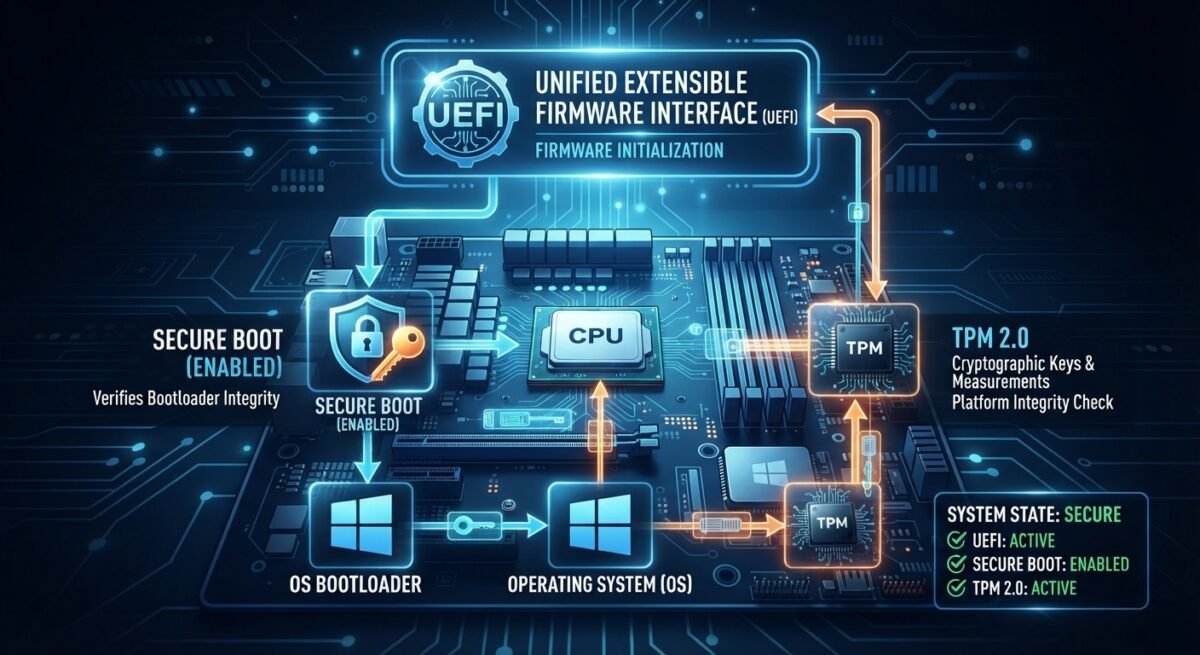
Modern computer security begins milliseconds after you press the power button—long before an operating system kernel loads, user accounts authenticate, or antivirus software initializes. For decades, personal computers relied on legacy BIOS firmware that ran in 16-bit real mode, addressed limited memory, and read executable code from a Master Boot Record without cryptographic verification. Today, three foundational technologies—UEFI, Secure Boot, and the Trusted Platform Module (TPM)—form the architectural backbone of trusted startup on modern PCs, servers, and embedded systems.
UEFI: Modernizing the Firmware Layer
The Unified Extensible Firmware Interface (UEFI) replaced legacy BIOS as the standard interface between platform hardware and the operating system. Governed by the UEFI Forum and defined across formal standards such as the UEFI Specifications, UEFI operates natively in 32-bit or 64-bit mode, supports drives larger than 2 terabytes via the GUID Partition Table (GPT), and provides structured boot services, runtime services, and pre-boot applications.
Rather than treating boot code as an opaque blob dumped into low memory, UEFI boots directly from files stored on an EFI System Partition (ESP), typically formatted as FAT32. Open-source reference implementations like TianoCore EDK II and operating-system integrations documented in the Linux Kernel UEFI Documentation and the ArchWiki UEFI Guide illustrate how UEFI passes memory maps, configuration tables, and device handles cleanly to the OS.
Because UEFI is modular and extensible—supporting pre-boot drivers, network boot stacks, and non-volatile UEFI variables—it is far more capable than legacy BIOS. Yet that very flexibility expands the early-boot attack surface, making cryptographic enforcement essential.
Secure Boot: Enforcing Cryptographic Trust Before the OS
Secure Boot is a security feature defined within the UEFI specification that ensures a system only executes bootloaders, option ROMs, and pre-boot drivers signed by trusted cryptographic keys. As explained in Microsoft’s Secure Boot Documentation and Microsoft’s Secure Boot and Trusted Boot Guide, Secure Boot relies on key databases stored in protected non-volatile memory:
- Platform Key (PK): Establishes top-level trust between the platform owner and the firmware, authorizing updates to key exchange credentials or disabling Secure Boot.
- Key Exchange Key (KEK): Bridges the PK and signature databases, allowing operating system vendors and hardware partners to update trusted or revoked signatures.
- Signature Database (
db): Lists hashes and X.509 certificates of approved boot binaries that are permitted to run. - Forbidden Signatures Database (
dbx): Lists known compromised or vulnerable binaries and certificates that must be blocked even if previously trusted.
By halting execution when an unsigned or dbx-revoked bootloader is encountered, Secure Boot helps stop bootkits and pre-OS malware from hijacking control before the operating system starts. At the same time, it is a preventive gatekeeper rather than a complete tamper log or recovery engine—which is where the TPM and broader firmware resiliency guidelines come in.
TPM: Hardware-Backed Roots of Trust and Attestation
A Trusted Platform Module (TPM) is a cryptographic security processor or isolated security subsystem standardized by the Trusted Computing Group, with modern systems widely adopting the Trusted Computing Group TPM 2.0 Library and architectural guidance in the TCG TPM 2.0 Brief Overview.
A TPM provides several core security capabilities:
- Protected Key Storage: It generates and stores cryptographic keys inside a protected boundary so secrets—such as volume encryption keys used by BitLocker or Linux disk-encryption workflows—are never exposed in plaintext to system RAM.
- Measured Boot & Platform Configuration Registers (PCRs): Rather than merely blocking untrusted code like Secure Boot, measured boot records cryptographic hashes (“measurements”) of firmware stages, bootloaders, and OS components into TPM PCRs in a tamper-evident chain.
- Sealing and Remote Attestation: Keys can be sealed so the TPM only unseals them when PCR values match an expected healthy boot state; attestation allows a system to prove its measured boot state to an external verifier or enterprise policy server.
TPM implementations vary across discrete chips, integrated silicon, and firmware TPMs running inside a trusted execution environment, each balancing physical tamper resistance, cost, and manageability.
How They Work Together—and Why Firmware Resiliency Matters
UEFI, Secure Boot, and the TPM are complementary layers rather than substitutes:
- UEFI provides the modern pre-boot environment and standardized interfaces.
- Secure Boot enforces signature verification so unauthorized pre-OS code cannot run.
- TPM safeguards cryptographic keys and records boot measurements to verify integrity and gate secret release.
Even with all three active, defenders must account for firmware vulnerabilities, certificate lifecycle management—such as updating aging 2011 Secure Boot certificates noted in Microsoft’s OEM Secure Boot Guidance—and supply-chain or update integrity. Frameworks like NIST SP 800-193: Platform Firmware Resiliency Guidelines emphasize protecting firmware against unauthorized modification, detecting tampering or corruption, and recovering quickly to a known-good state. Together, UEFI, Secure Boot, and the TPM turn startup from a blind leap of faith into a verifiable chain of trust.
Source Bibliography
- UEFI Forum. UEFI Forum Official Portal. Available at: https://uefi.org/
- UEFI Forum. UEFI Specifications. Available at: https://uefi.org/specifications
- Microsoft Learn. What Is Secure Boot for Windows? Available at: https://learn.microsoft.com/en-us/windows-hardware/drivers/bringup/secure-boot
- Microsoft Learn. Secure Boot and Trusted Boot. Available at: https://learn.microsoft.com/en-us/windows/security/operating-system-security/system-security/trusted-boot
- Microsoft Learn. Secure Boot (OEM Device Experiences). Available at: https://learn.microsoft.com/en-us/windows-hardware/design/device-experiences/oem-secure-boot
- Trusted Computing Group. TPM 2.0 Library Specification. Available at: https://www.trustedcomputinggroup.org/resources/documents/tpm-library-specification
- Trusted Computing Group. Trusted Platform Module (TPM) 2.0: A Brief Introduction. Available at: https://medias.cdn.trustedcomputinggroup.org/production/2019_TCG_TPM_2_Brief_Overview_DR_02web_738f119ed7.pdf
- National Institute of Standards and Technology (NIST). SP 800-193: Platform Firmware Resiliency Guidelines. Available at: https://csrc.nist.gov/pubs/sp/800/193/final
- TianoCore Project. What is TianoCore? (EDK II). Available at: https://www.tianocore.org/
- The Linux Kernel Documentation. The Unified Extensible Firmware Interface (UEFI). Available at: https://kernel.org/doc/html/v5.11/arm/uefi.html
- ArchWiki. Unified Extensible Firmware Interface. Available at: https://wiki.archlinux.org/title/Unified_Extensible_Firmware_Interface